Flag Events 3D Mockup: Visualizing Outdoor Branding with Realistic Fabric Displays
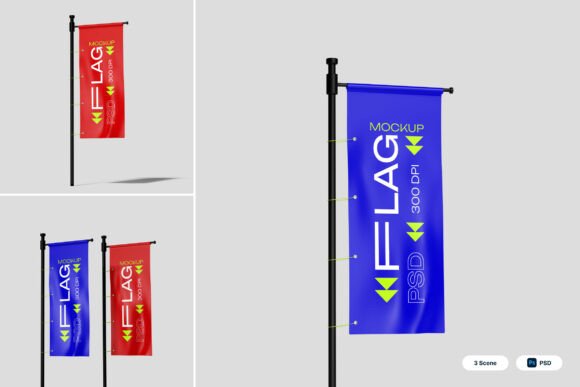
When pitching an outdoor advertising campaign or finalizing signage for a festival, flat 2D designs often fail to convey how the branding will actually look in a physical space. The Flag Events 3D Mockup bridges this gap by providing a photorealistic visualization of vertical fabric banners and standing pole displays. This resource is specifically engineered for marketers, event organizers, and designers who need to present customizable branding areas in a context that feels tangible. Rather than guessing how a logo will wrap around a curved pole or how fabric texture affects color vibrancy, users can generate high-resolution presentations that accurately reflect real-world conditions.
Elevating Festival and Sports Event Proposals
Festivals and sporting events rely heavily on vertical signage to guide attendees and secure sponsor visibility. In these environments, sightlines are critical. A standard rectangular banner mockup does not account for the way feather or teardrop flags move and stand in outdoor settings. Using the Flag Events 3D Mockup allows event planners to demonstrate exactly where sponsor logos will appear relative to crowd flow and stage backdrops.
For example, a sponsorship coordinator pitching to a beverage brand for a summer music festival can use these mockups to show the flag positioned on grass or pavement, complete with realistic lighting and shadows. This level of detail helps stakeholders understand the value of their investment. Instead of imagining a logo placement, they see a professional-grade asset that looks like it has already been manufactured. This reduces friction during the approval process and minimizes post-production disputes regarding visibility or scale.
Storefront Advertising and Street Marketing Applications
Retailers and local businesses frequently use standing pole displays to capture foot traffic, but the transition from digital design to sidewalk reality can be jarring. Colors that look vibrant on a monitor may appear muted against concrete or under direct sunlight. The 4000 x 3000 pixel resolution at 300 dpi ensures that the Flag Events 3D Mockup provides enough clarity to evaluate these nuances before printing.
Consider a coffee shop launching a seasonal promotion. The owner needs to know if the new pastel color palette will stand out against the gray urban environment or blend in too much. By applying the design to the smart object layers, they can instantly visualize the outcome. This practical application extends to street marketing teams managing multiple locations. Consistency is key in guerrilla marketing; being able to preview how the same flag design interacts with different background contexts ensures brand integrity across various city blocks or storefronts.
Professional Exhibition and Corporate Promotion Displays
Trade shows and corporate exhibitions demand a polished aesthetic. Booth designers often struggle to integrate outdoor-style flags into indoor booth renders without them looking pasted on. Because this mockup features realistic fabric textures and proper pole curvature, it integrates seamlessly into broader exhibition display concepts. It allows designers to create cohesive visual narratives where outdoor and indoor branding elements feel part of the same system.
Corporate communications teams also benefit when preparing internal reports or stakeholder updates. Showing a realistic rendering of upcoming promotional materials conveys professionalism and preparedness. Whether presenting to a board of directors or updating a franchise network, the ability to showcase high-fidelity visuals of standing pole displays demonstrates that the marketing strategy has been thoughtfully considered down to the physical execution.
Ecommerce Showcases and Print-on-Demand Previews
For entrepreneurs running print-on-demand stores or selling custom signage services, product photography is a significant barrier to entry. Organizing a photoshoot for every new flag design is cost-prohibitive and time-consuming. The Flag Events 3D Mockup serves as a scalable solution for ecommerce showcases. Sellers can generate consistent, professional product images for hundreds of SKUs without ever setting up a camera.
This is particularly valuable for testing market demand. A freelancer or small business owner can create listing images for a niche sports team or local charity event using the mockup, gauge interest through pre-orders or inquiries, and only proceed to manufacturing once validation is secured. The realistic presentation builds trust with buyers who might otherwise be skeptical of generic digital renderings. When customers can clearly see the fabric drape and pole structure, conversion rates typically improve because the perceived risk of purchasing decreases.
Streamlining Workflow with Smart Object Layers
The technical utility of this resource lies in its efficiency. Included are three PSD files featuring smart object layers that simplify the customization process. Users simply double-click the layer, place their flat artwork, and save. The software automatically warps and adjusts the design to match the flag’s curvature and perspective. This eliminates the manual distortion work that often makes flag mockups look amateurish.
Time savings here are substantial for agencies handling multiple clients. A designer working on a rebranding project for three different companies can produce distinct, high-quality visualizations in minutes rather than hours. The included PDF help file further reduces the learning curve, ensuring that even those less familiar with advanced Photoshop techniques can achieve professional results. This accessibility makes the tool viable for educators teaching graphic design, hobbyists creating personal projects, and seasoned professionals alike.
Practical Considerations Before Implementation
While the Flag Events 3D Mockup is a powerful asset, users should approach it with realistic expectations. It is crucial to note that all stock imagery inside the mockup is not included. This means the background environments are placeholders, and users must either utilize the transparent/neutral backgrounds provided or source their own environmental photography to composite the flags into specific scenes. Understanding this limitation upfront prevents workflow interruptions.
Additionally, users should consider the aspect ratio of their designs relative to the mockup templates. Vertical fabric banners have specific dimensional constraints. Applying a wide horizontal logo to a narrow teardrop flag template may result in cropping or awkward scaling. Reviewing the dimensions of the smart objects before beginning the design phase ensures that branding elements remain legible and aesthetically balanced.
File management is another practical consideration. With high-resolution files at 300 dpi, system performance can vary depending on hardware capabilities. Ensuring adequate RAM and scratch disk space is available will prevent lagging during the editing process. For users working on laptops or older machines, it may be beneficial to work at a lower resolution during the drafting phase and only switch to full 4000 x 3000 pixel output for the final export.
Maximizing Impact Across Diverse User Groups
Different users derive unique value from this resource based on their specific objectives. Freelance graphic designers use it to upsell clients on comprehensive branding packages by showing applications beyond business cards and websites. Educators incorporate it into curriculum to teach students about environmental graphics and material considerations in design. Small business owners leverage it to maintain brand consistency without hiring expensive agencies.
The versatility of the standing pole display format makes it applicable across seasons and industries. A winter market organizer uses it to preview snow-resistant flag placements, while a beach resort uses it to visualize wind-resistant signage for summer promotions. The key is treating the mockup not just as a presentation tool, but as a planning instrument. By visualizing the end product early, users can identify potential issues with contrast, sizing, or placement before committing to production costs.
Ultimately, the Flag Events 3D Mockup succeeds because it addresses the fundamental challenge of environmental graphic design: translating two-dimensional creativity into three-dimensional reality. Whether used for securing sponsorships, enhancing ecommerce listings, or refining corporate identity, it provides the visual confidence needed to move projects forward. The combination of high-resolution output, user-friendly smart objects, and realistic fabric rendering makes it an essential component in the toolkit of anyone serious about outdoor and event branding.