Elevating Textile Presentation with Fabric Swatches 3D Mockups
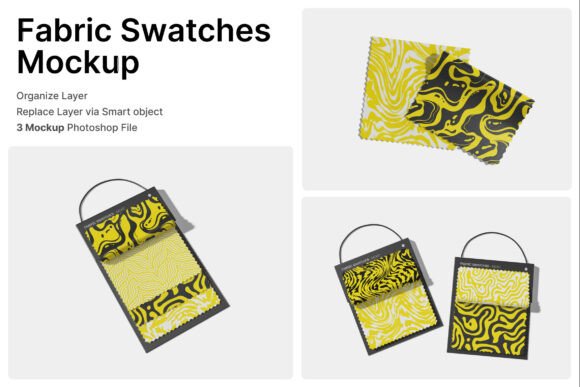
In the tactile world of textiles, fashion, and interior design, the gap between a digital pattern and physical reality can often feel vast. Clients and customers need to visualize not just the color or print of a fabric, but its weight, drape, and texture. This is where the Fabric Swatches 3D Mockup becomes an indispensable tool for modern creatives. Showcasing realistic textile sample cards with folded fabric pieces arranged specifically for material presentations and pattern previews, this resource bridges the divide between flat digital design and tangible product perception.
Whether you are managing a textile branding project, curating a fashion collection, compiling an upholstery catalog, or running a tailoring business, understanding how to leverage high-quality 3D mockups is essential. This guide explores the significance of these mockups, their practical applications across various industries, and how to utilize the included technical assets effectively.
The Significance of Realistic Textile Visualization
To understand the value of a Fabric Swatches 3D Mockup, one must first appreciate the limitations of traditional digital portfolios. A flat JPEG of a floral pattern tells a viewer what the print looks like, but it fails to communicate how that print behaves when draped over a cushion or folded into a garment. In e-commerce and B2B sales, this lack of context can lead to hesitation or returns.
A 3D mockup introduces contextual realism. By presenting the fabric as a folded swatch card, the mockup mimics the exact experience a buyer would have in a showroom or fabric store. The folds create natural shadows and highlights, revealing the weave density and surface texture that flat images obscure. For surface pattern designers, this means your work is judged on its true merit rather than being dismissed due to poor presentation. For business owners, it elevates the perceived value of the inventory before a single yard of cloth is cut.
Bridging Digital Design and Physical Expectations
One common misunderstanding in digital textile design is assuming that screen accuracy equals product accuracy. While color calibration is important, presentation format is equally critical. When a client sees a fabric presented professionally on a swatch card within a high-resolution mockup, they subconsciously associate the design with quality manufacturing and professional retail standards. This psychological cue is vital for independent designers trying to compete with established mills.
Versatile Applications Across Industries
The utility of the Fabric Swatches 3D Mockup extends far beyond a single niche. Its versatility makes it a cornerstone asset for multiple sectors within the creative and manufacturing economies.
- Fashion Collections: Designers use these mockups to present seasonal colorways and print variations to buyers without producing expensive physical samples for every iteration.
- Upholstery and Interior Materials: Furniture manufacturers can showcase new textile lines in catalogs, allowing clients to visualize materials in a standardized, premium format.
- Tailoring and Sewing Supplies: Bespoke tailors and online fabric retailers can create cohesive lookbooks that display fabric weight and drape alongside technical specifications.
- Surface Pattern Design: Artists selling digital patterns can demonstrate how their work translates to physical media, increasing licensing potential.
- Textile Branding: Mills and distributors use consistent mockup templates to maintain brand identity across thousands of SKUs in digital marketplaces.
In educational settings, such as fashion schools or textile technology programs, these mockups serve as excellent teaching aids. They help students understand industry-standard presentation methods and the importance of merchandising materials before they enter the workforce.
Technical Excellence: Understanding the Asset Specifications
For professionals, the aesthetic appeal of a mockup is only half the equation; technical specifications dictate workflow efficiency and output quality. This specific Fabric Swatches 3D Mockup package is engineered to meet rigorous professional standards.
High-Resolution Output for Print and Digital
The mockup boasts a resolution of 4000 x 3000 pixels at 300 DPI. This specification is crucial. While 72 DPI suffices for web thumbnails, 300 DPI is the industry standard for print catalogs, lookbooks, and large-format displays. Having a source file at this resolution ensures that whether you are designing an Instagram post or a glossy trade show brochure, the image remains crisp and artifact-free. The 4000-pixel width provides ample room for cropping and composition adjustments without sacrificing detail.
Smart Object Workflow Efficiency
Time is money in production environments. This mockup utilizes Smart Object layers, which streamline the customization process significantly. Instead of manually warping, shading, and blending your pattern onto a 3D render, the Smart Object acts as a dynamic container.
- Open the PSD file in Adobe Photoshop.
- Locate the designated Smart Object layer.
- Double-click the layer thumbnail to open the embedded document.
- Paste or place your unique fabric design.
- Save the embedded document (Ctrl/Cmd + S).
- Return to the main mockup file to see your design automatically applied with all lighting, shadows, and folds intact.
This non-destructive workflow allows for rapid iteration. You can test dozens of patterns in minutes, making it ideal for client approval rounds or A/B testing marketing visuals.
Navigating Included Files and Best Practices
When downloading professional creative assets, organization is key to long-term usability. This package includes 3 PSD Files and comprehensive Help Guide Files. Understanding why multiple PSDs are provided is important for maximizing the asset's value.
Typically, multiple PSD files offer different angles, lighting setups, or arrangements of the swatch cards. Perhaps one file features a close-up macro shot emphasizing texture, while another shows a wider arrangement suitable for catalog headers. Having three distinct compositions prevents visual fatigue in your portfolio and allows you to match the mockup style to the specific mood of each project.
The Importance of Documentation
The inclusion of a PDF Help File distinguishes premium assets from generic freebies. Even experienced Photoshop users benefit from reviewing the creator’s documentation. It often contains specific tips regarding color profiles, recommended blend modes for specific fabric types, or troubleshooting advice for Smart Objects. Taking five minutes to read this guide can save hours of frustration and ensure you are extracting the maximum fidelity from the 300 DPI source files.
Licensing and Stock Awareness
A critical note for users: All image stock inside are not included. This is a standard practice in professional mockup distribution. The mockup provides the stage (the 3D rendered swatch cards, lighting, and background environment), but you must provide the actor (your own fabric design). This distinction protects intellectual property rights and ensures that the mockup serves as a customizable template rather than a finished piece of clip art. Always ensure you have the commercial rights to any patterns or textures you apply to the Smart Objects.
Enhancing Modern Creative Workflows
Incorporating Fabric Swatches 3D Mockups into your workflow represents a shift toward more sustainable and efficient design practices. Traditionally, creating a sample card required printing fabric, cutting it to size, gluing it to cardstock, and photographing it under studio lights. This process consumes materials, generates waste, and takes days.
Digital mockups eliminate this physical overhead. They allow for instant revisions—if a client dislikes a colorway, you can swap it in seconds rather than re-shipping physical samples. Furthermore, in an era of remote work and global supply chains, digital assets facilitate collaboration across time zones. A manufacturer in Italy can send a photorealistic swatch presentation to a retailer in New York instantly, maintaining momentum in the product development cycle.
Building a Broader Understanding of Material Presentation
Ultimately, mastering the use of tools like the Fabric Swatches 3D Mockup is about more than just software proficiency; it is about developing a sophisticated eye for material communication. As you experiment with different patterns and observe how they interact with the 3D folds, you gain insights into how scale, contrast, and texture function in three-dimensional space.
This knowledge feeds back into the design process itself. You may begin to design patterns with the end-product visualization in mind, creating repeats that flow better across seams or selecting colors that retain depth when shaded. The mockup ceases to be merely a presentation tool and becomes a part of the creative feedback loop.
By utilizing high-resolution, professionally structured assets with Smart Object technology, designers and businesses can present their textile products with confidence. Whether for a bespoke tailoring portfolio, a mass-market upholstery catalog, or an indie fashion brand, the ability to showcase realistic, tactile fabric samples digitally is a defining competency in today’s visual marketplace. Embracing these tools not only enhances aesthetic appeal but also streamlines operations, reduces waste, and clarifies communication between creators and their audiences.